Turn off "Flag for Review" before ordering Instagram followers or they won't be delivered.
Turn Off "Flag for Review"
Do this before ordering Instagram followers. It takes about a minute on your phone.
1
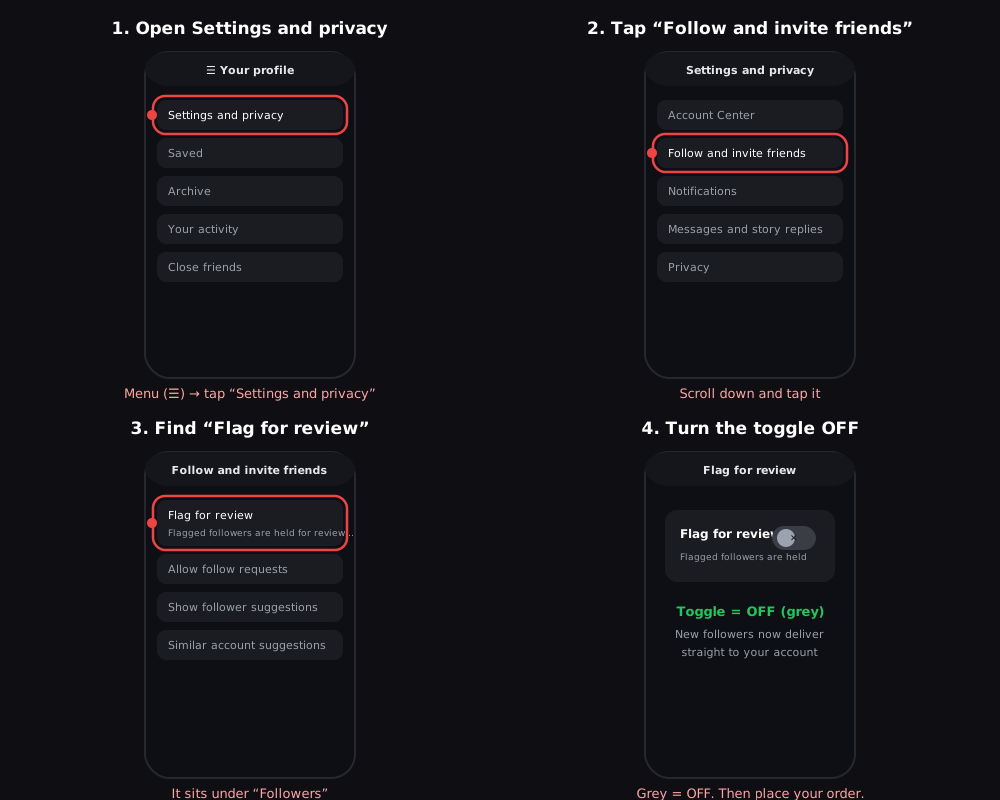
Open Settings and privacy
Go to your Instagram profile, tap the menu (☰) in the top right, then tap Settings and privacy.
2
Tap "Follow and invite friends"
Scroll down and tap Follow and invite friends.
3
Find "Flag for review" under Followers
You'll see a toggle labelled Flag for review, with a note that flagged followers are held for review in your Followers list.
4
Turn the toggle OFF
Tap the toggle so it turns grey/off. This stops Instagram from holding new followers for review, so your order delivers normally.
Already placed an Instagram followers order and nothing arrived? Turn the setting off, then reply from the Support page with your order number and we will get it delivered.
Order Instagram followers